
November 4, 2026
One Head or Two: Choosing the Upstream Interface on a USB Hub
Single-head USB-A vs dual-head USB-A plus Type-C upstream on a four-port hub: compatibility trade-offs, BOM and after-sales effects, spec lines.

Dieser Beitrag ist auf Englisch verfügbar.
A four-port hub is bought on its downstream side: port count, shapes, speed. The upstream end gets one line, written as whatever connector the buyer's laptop happens to carry. That line decides more of the field outcome than the port count does.
This note compares three upstream arrangements we build and sell — a single USB-A head, a dual head carrying USB-A and Type-C, and a Type-C-only head — for compatibility, bill of materials and after-sales attribution. Power sizing and network variants are separate decisions.
What the Upstream Head Decides
The head fixes three things at once: which hosts work without an adapter, which cable the user is attached to for the life of the product, and how many parts sit between controller and host. Two four-port hubs rated at 5 Gb/s read the same on a datasheet; what changes is the population of machines they reach, and the number of ways a user can connect one wrongly.
The Single-Head Case
A single USB-A head is the most predictable arrangement: one insertion that works, one cable exit direction, no question about which end faces the host. HB2011 is our reference — upstream USB 3.0, downstream 4×USB3.0, 5 Gb/s, a 100 cm cable, 45 g in an ABS body, three-year warranty.
The trade-off is reach. Every host without a USB-A port needs an adapter, and an adapter is a second contact surface and a second item to lose. On a fixed desk that cost is near zero; across a fleet of thin laptops it is the entire complaint. The downstream mix stays simple too: four 5 Gb/s ports for a TF card reader, a keyboard and a mouse.
The Dual-Head Case
A dual head puts USB-A and Type-C upstream so one unit serves an older desktop and a current laptop without an adapter between them. HB2023 carries upstream USB 3.0 + Type-C3.0 and downstream 2×USB2.0 + Type-C2.0 + Type-C3.0 at 5 Gb/s, with a 9 cm cable and a three-year warranty.
The downstream mix moves as well: four USB-A become two USB-A plus two Type-C, and the two Type-C ports are not equivalent. The 2.0 port carries USB 2.0 data; the 3.0 port carries the 5 Gb/s path. A housing that says Type-C twice while saying the speed once invites this category's most common wrong conclusion.
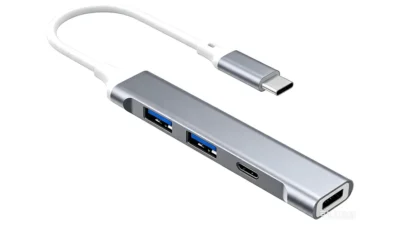
The third arrangement isolates what the second head costs. HB2020 is Type-C-only upstream with the same downstream layout as HB2023 at 5 Gb/s and a 9.3 cm cable, and 17.4 g against 23.6 g. Same ports, one head: the difference sits in the second connector, its opening and its strain relief, not the data path.
Three Configurations Side by Side
| Line | HB2011 | HB2023 | HB2020 |
|---|---|---|---|
| Upstream head | USB-A ×1 | USB-A ×1 + Type-C ×1 | Type-C ×1 |
| Downstream ports | 4×USB3.0 | 2×USB2.0 + Type-C2.0 + Type-C3.0 | 2×USB2.0 + Type-C2.0 + Type-C3.0 |
| Cable length | 100 cm | 9 cm | 9.3 cm |
| Unit weight | 45 g | 23.6 g | 17.4 g |
| Fits | Desktop-heavy desk | Mixed fleet, shared desks | Type-C-only fleet |
Where the Second Head Moves BOM and After-Sales
A second head is never one part. It adds a connector, a shell opening with its own tolerance stack, a strain-relief feature, an assembly step, an inspection point, and a second legend. The weight records it: 17.4 g for the Type-C-only HB2020 against 23.6 g for the dual-head HB2023, with identical downstream port counts.
After-sales is less about the extra part than about ambiguity:
- It does not work on my laptop. The customer used the head the machine does not accept, or the right head on a host port rated below the hub.
- Only one port is fast. A Type-C 2.0 port was read as 5 Gb/s, because the shape matched and the label did not.
- It disconnects when the cable moves. Two heads mean two insertion points, and the unit is judged by the looser of the two.
Single-head units concentrate risk differently: fewer misuse routes, but every Type-C-only host becomes an adapter request — a compatibility complaint rather than a hardware fault.
Mapping a Mixed Fleet
The decision is a count, not an opinion. Sort the machines into USB-A only, both and Type-C only, then weigh whether the hub travels, since a meeting-room unit meets every machine in the building.
- USB-A only, fixed desks: single head. HB2011 fits, and nothing needs explaining.
- Mixed fleet, shared desks or meeting rooms: dual head. HB2023 removes the adapter.
- Type-C only: a Type-C-only upstream such as HB2020, with one fewer part.
If a meaningful part of the fleet is Type-C only, the single-head option needs an adapter in the box, and the two are then compared as kits rather than as hubs.
Specification and Acceptance Lines
Most specifications reduce the upstream side to "USB 3.0 input" and stop. Six items make it testable:
1. Connector type and count. Write the string, not the word: USB-A ×1, USB-A ×1 + Type-C ×1, Type-C ×1.
2. Rate per head and path sharing. State each head's rated rate, and whether the heads share one upstream path or provide a second channel.
3. Behaviour with both heads connected. Priority, first-come locking, or a documented instruction to use one at a time.
4. Cable length and exit direction, measured from housing to plug, with a tolerance and a pull test at the strain relief.
5. Rate labelling. Every Type-C port marked with its own rate, matching manual and retail box. A shape-only label is a specification defect even when the hardware is right.
6. Host compatibility by port type. Which port to choose on a laptop that offers both, and what changes if that port is data-limited.
Three checks cover those lines. Plug each head into a matching host and confirm enumeration plus a 5 Gb/s link. Connect both heads to one host and confirm the documented behaviour. Confirm every downstream Type-C port delivers the rate printed beside it. Head interaction is what single-head testing never exercises.
Frequently Asked Questions
Is a dual-head hub slower than a single-head one?
Not on the upstream rating: both carry 5 Gb/s here. The second head is an alternative input, not an additional channel, so confirm how the heads share the path.
Can both upstream heads be connected at once?
That depends on the design and must be written down. Two hosts on one hub can create a condition the product was never validated for, so ask for the rule.
Why are some Type-C ports on the hub slower than others?
Because shape and rate are separate choices. In HB2023 and HB2020 the downstream set is 2×USB2.0 + Type-C2.0 + Type-C3.0, so one Type-C port runs at USB 2.0 and one at 5 Gb/s.
Choosing between these arrangements is a fleet question before a product question. Shenzhen LingC Industrial Co., Ltd. reviews the three upstream configurations against the machines a buyer supports and the pack the unit ships in, and recommends the one that keeps adapters out of the box. Send the port mix you need to Cherie at Cherie@lingctech.com.
Dieser Beitrag ist auch im lingctech.com-Blog veröffentlicht.Originalbeitrag ansehen
In diesem Beitrag genannte Modelle

USB-Hubs & Docks
HB2011
4-Port-USB-Hub mit USB 3.0
- Schnittstelle
- Input: USB 3.0 Output: 4×USB 3.0
- Kapazität
- —
- Geschwindigkeit
- —
USB-Hubs & Docks
HB2023
4-Port-USB-Hub mit Dual-Eingang
- Schnittstelle
- Input: USB 3.0 + Type-C Output: 2×USB 2.0 + Type-C 2.0 + Type-C
- Kapazität
- —
- Geschwindigkeit
- —
USB-Hubs & Docks
HB2020
4-Port-USB-Hub mit Type-C
- Schnittstelle
- Input: Type-C Output: 2×USB 2.0 + Type-C 2.0 + Type-C
- Kapazität
- —
- Geschwindigkeit
- —
Sie beschaffen die Produkte aus diesem Beitrag?
Senden Sie Modelle und Mengen — Preis, Lieferzeit und Muster in 1-2 Werktagen.