
November 8, 2026
Card Readers Across Windows, macOS and Linux: Compatibility Before Deployment
Why the same card reader behaves differently on Windows, macOS and Linux, what enterprise policy breaks, and how to run a deployment acceptance check.
この記事は英語でご覧いただけます。
Card readers are bought as an accessory and deployed as infrastructure: one per reception desk, one per meeting room, one per production station. What decides whether that rollout holds is not read speed. It is whether the same reader enumerates the same way on every machine image in the estate, and whether existing policy allows it to mount at all.
Where the driver boundary actually sits
A TF card reader is a USB Mass Storage device. The bridge chip presents the card as a SCSI logical unit and the in-box class driver does the rest: USBSTOR on Windows, the mass storage driver on macOS, usb-storage on Linux. Nothing is installed, and nothing needs to be.
Three interface class codes settle the question: 08 for mass storage, 06 for the SCSI transparent command set, 50 for bulk-only transport. A device reporting that combination has had a driver in every mainstream desktop OS for more than two decades. That is the whole content of the "driver-free" claim: confirm it with a descriptor viewer on the sample, not the datasheet.
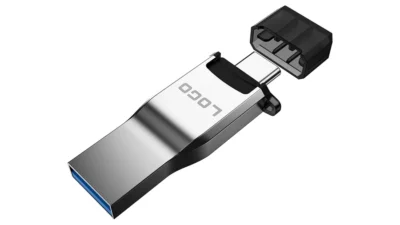
The boundary appears where a product leaves the class. A reader that adds a second logical unit, an encryption layer, a vendor channel for LED or firmware control, or a bridge merging two slots into one volume needs a vendor driver. Single-slot TF readers such as RD3015, RD3001 and RD5011 stay inside the class: one logical unit, one removable volume, no installation. The dual-head RD3015 exposes that same unit through either its USB-A or its Type-C plug, so both hosts read identical descriptors.
One caution: driver-free is not installer-free. Firmware tools and production-line utilities are separate software.
Drive letters, mount points, and where the systems diverge
The moment a card is mounted the three systems part company, and most "incompatible reader" tickets are really mount-behaviour tickets.
| System | How the volume appears | What breaks at machine twelve |
|---|---|---|
| Windows | Next free drive letter, allocated per session | A mapped network drive or a second USB device takes the letter the ingest script expects; letters are not stable across reboots |
| macOS | Volume name under /Volumes | Duplicate card labels gain a numeric suffix, so two identical cards collide during a batch copy; an unejected card leaves a stale mount |
| Linux desktop | /media or /run/media, owned by the session user | Mounting depends on the desktop session and the authorisation agent, so a headless or kiosk host has no automount at all |
On Windows, treat the drive letter as a display detail, not an identity: scripted ingest should address the volume by serial number or parent device path. On macOS, label cards uniquely per batch unless the operator enjoys reading "NO NAME 1" in a log. On Linux, a kiosk with no logged-in session has no automount, so a udev rule plus a mount unit separates a working station from a support call. Eject is not optional either: pulling a card while the system holds cached writes is the most common way a card "fails" during rollout and tests clean on the bench.
What enterprise images and permission policy break
On a corporate image the reader competes with controls written for USB flash drives, and it loses by default.
- Device installation restrictions can block a whole device class rather than one model. A reader permitted on the engineering build can be invisible on the locked-down build, with no message beyond a device that fails to start.
- Removable storage access policy can deny write access, or deny all access. A reader used only for ingest belongs in the read-only exception, not the blanket block.
- Removable media encryption policy may demand encryption on first write, which on a kiosk surfaces as a dialog nobody can answer.
- Endpoint agents that police USB by vendor and product ID need the reader's own identifiers. A reader is not a flash drive and does not inherit its exception.
- On macOS, a newly attached USB-C accessory asks for user approval, and a managed Mac can decline that prompt by policy. A dismissed prompt is indistinguishable from a dead reader.
- On Linux, authorisation frameworks, udev rules and mount options decide access before the filesystem is reached. A reader can enumerate correctly and still be unmountable.
Acceptance checklist for meeting rooms, reception and the line
Run every row on the image that will ship, with the card batch that will be used. Check the port first: a reader on a USB 2.0 port is a USB 2.0 device for that session, capped by the 480 Mb/s link.
| Check | Pass criteria |
|---|---|
| Enumerate on the golden image | Mass storage device with class codes 08 / 06 / 50; no unknown device in the tree |
| Mount, write, verify, eject | Volume mounts, a file writes and verifies, ejection completes without a warning |
| Run the ingest routine twice | Volume resolved by serial or device path, not by letter; both cards succeed |
| Confirm the policy exception | Allowlist and storage policy verified on the locked-down image, not the admin build |
| Record the physical path | Port, hub hop and negotiated link on the asset label and the room sheet |
Sequence the rollout: image, then attachment, then card
Collect the reader's vendor and product identifiers before imaging, so the allowlist is baked into the golden image rather than applied by hand afterwards. Attach on the final image, never the build machine, and test with the production card batch, because label collisions only surface with real media. Then fix the physical arrangement: one defined port per station, a short strain-relieved cable or a direct plug, and a label naming the machine. One reader, one card and three mount paths is a documentation defect, not a hardware one.
FAQ
Do these readers need a driver on Windows, macOS or Linux?
No. They present a single mass storage logical unit and use the class driver already in the operating system. What may need configuring is policy: installation restrictions, removable media access rules and USB authorisation.
Why does the same reader work on my laptop but not on the front desk PC?
Usually policy or port, in that order. Confirm whether the device enumerates, then whether the volume is blocked or merely unlettered. Compare device class restrictions on both machines before replacing hardware.
Is a Type-C reader usable on a USB-A-only machine?
Only through a passive adapter, and the link runs at whatever the port and adapter support. RD3015 carries both a USB-A and a Type-C plug, which removes the adapter from the desk; RD3001 and RD5011 are Type-C upstream and suit estates already standardised on Type-C.
Does ejecting matter when we only read cards?
Yes, once caching or indexing has touched the volume. Put eject in the room guide; it removes a category of tickets.
For a rollout that has to hold across three operating systems, start from the port, the slot count and the supported OS list rather than a peak figure. Shenzhen LingC Industrial Co., Ltd. supplies RD3015, RD3001 and RD5011, each with a 3-year warranty, and can advise on the model that fits a given deployment. Write to Cherie at Cherie@lingctech.com with the target machines and the card batch, and we will map the reader to the environment before the first unit is ordered.
この記事も lingctech.com のブログに公開しています。元記事を見る

本記事の製品をご検討中ですか?
型番と数量をお送りいただければ、1-2 営業日で価格・納期・サンプルのご案内をいたします。